Convert Excel to JSON via REST API
DreamFactory's Excel connector is capable of turning an entire Excel workbook or specific worksheet into a JSON response (CSV files are also supported). Workbooks can be retrieved from any DreamFactory supported file-system (AWS S3, SFTP, and Azure Blob Storage, among others), or as in the example we will run through below, uploaded directly to the server's local file system. Access is controlled just like any other connector with role-based access control and API keys.
Creating an Excel Connector Service
To create an Excel connector, log in to your DreamFactory instance using an administrator account and select the API Generation & Connections tab. Set your API Type to File, and then click the purple plus button to establish a new connection:
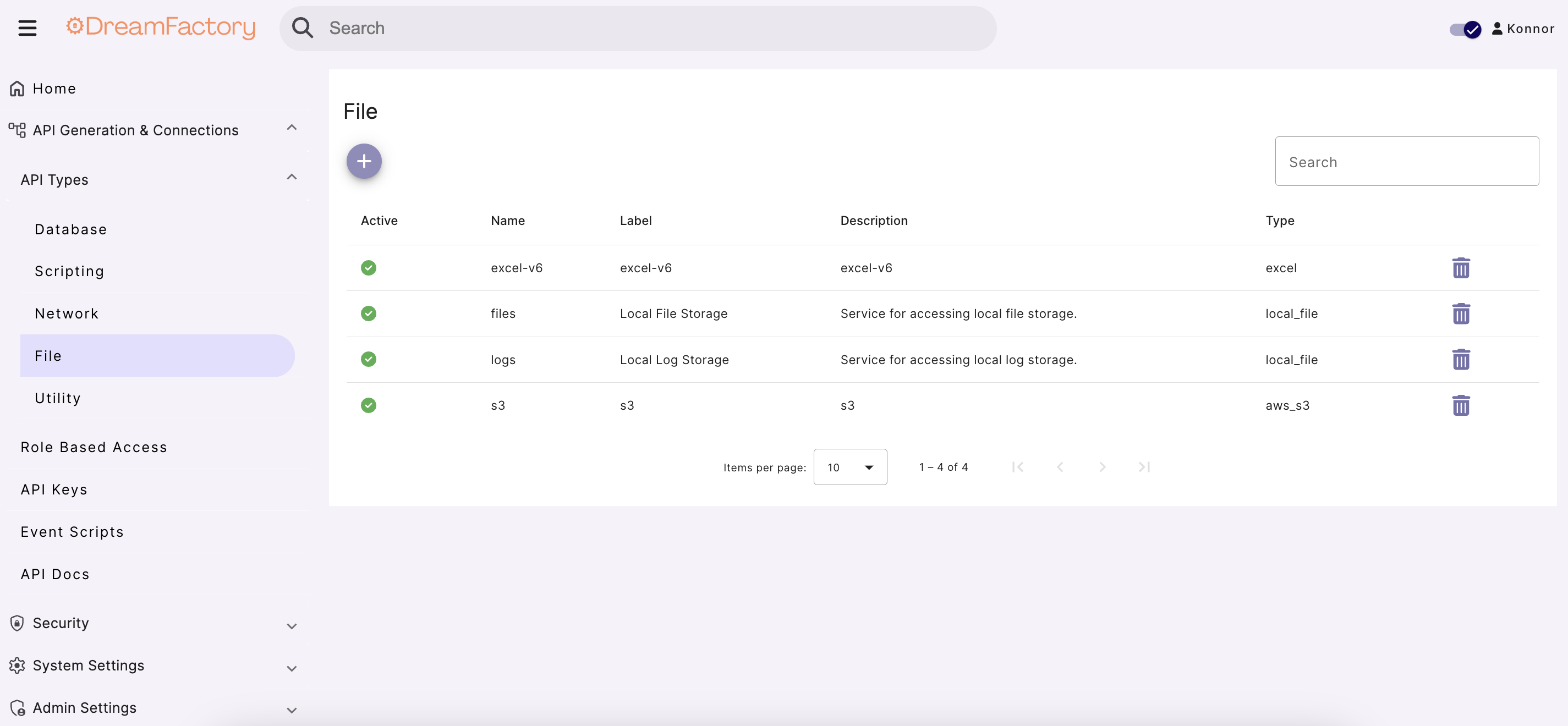
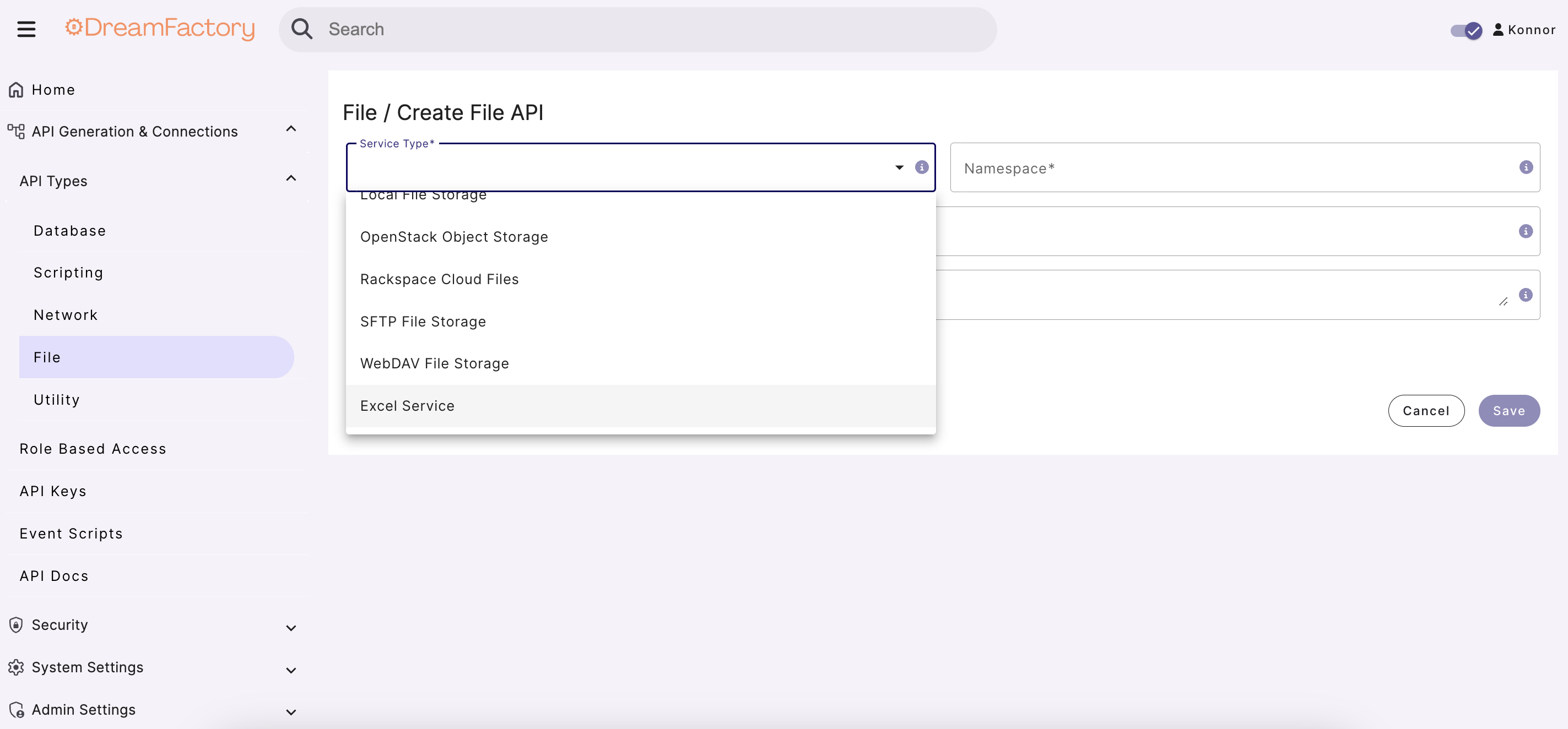
Navigate to the Excel option in the available service types:
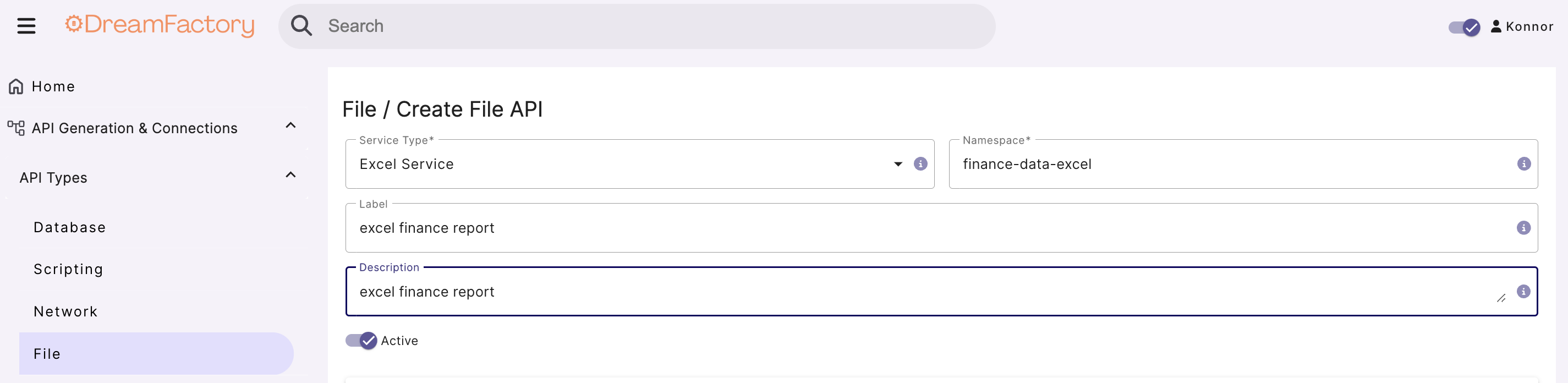
Next, provide a name, label and description for your Excel connector service:
In the configuration section, you'll need to set the file storage service. If you have already setup an AWS S3 API or other file service, then that service will be available to you. For this example, we will use the local file storage service, and we will put our Excel file in /opt/dreamfactory/storage/app which means we will set the container path as / (the 'root' of where DreamFactory will look for locally stored files).

The root location for local file storage is /opt/dreamfactory/storage/app. If you store an Excel file(s) here, your Storage Container Path will be /. If you create a folder in here, e.g. /opt/dreamfactory/storage/app/my-folder then your Storage Container Path will be /my-folder/.
Using the Excel API
Once configured, you will be able to access the API endpoint documentation via the API Docs tab. Here we have an example call to our workbook financial-sample.xlsx:
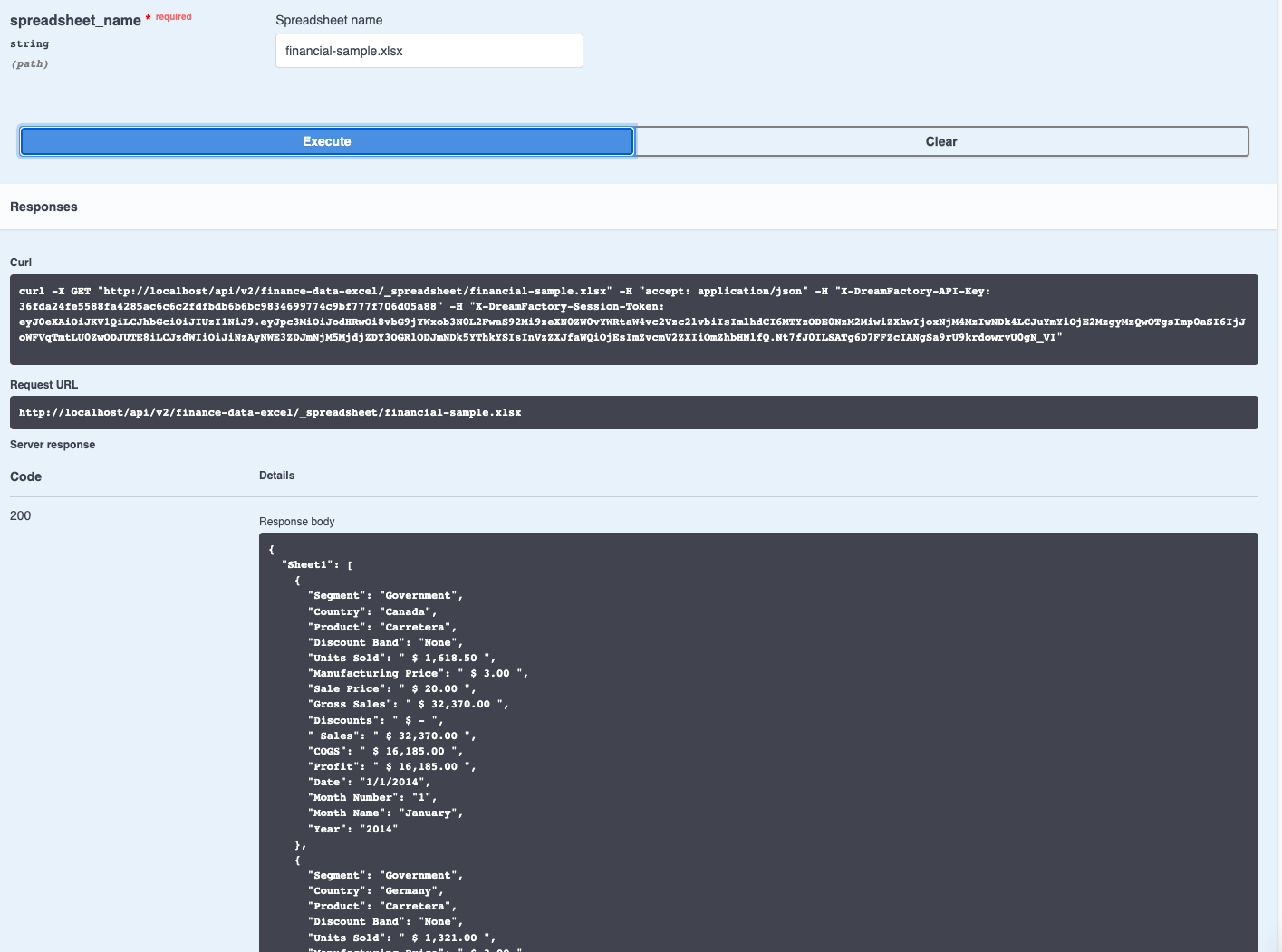
After configuring your Role and generating an API Key, you can interact with the Excel service. The below is a GET call to /api/v2/<excelServiceName>/_spreadsheet/<excelFilename>:
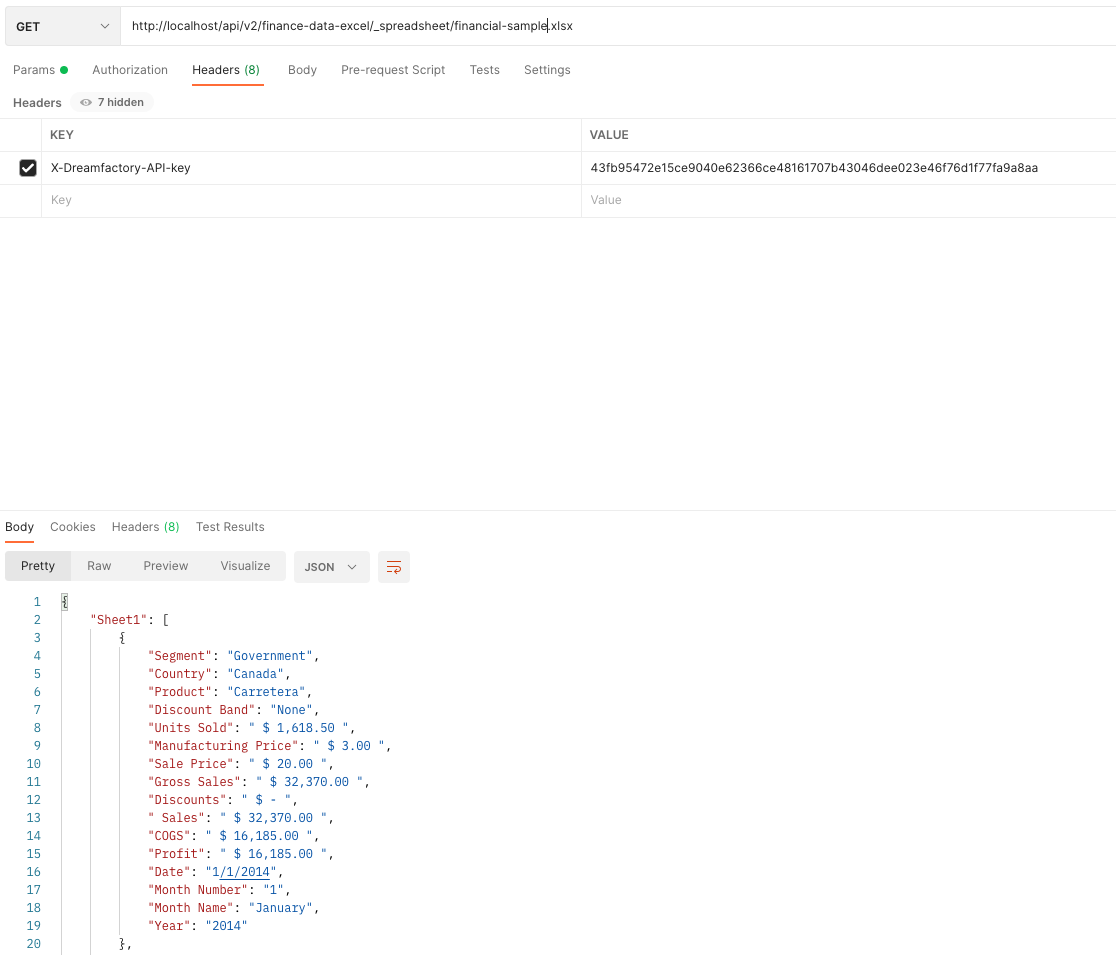
When creating a role for your Excel connector, you will also need to provide service access to the relevant file storage service, in addition to the Excel service. For local file storage this will be the default "files" service.
Code Examples
The following examples show how to call the DreamFactory Excel-to-JSON API from common client environments. Replace your-df-instance, YOUR_KEY, myfiles, and reports/data.xlsx with your actual values.
curl
curl -X GET \
  "https://your-df-instance/api/v2/myfiles/_spreadsheet/reports/data.xlsx" \
  -H "X-DreamFactory-API-Key: YOUR_KEY"
For file services that store Excel files directly (not using the _spreadsheet endpoint):
curl -X GET \
  "https://your-df-instance/api/v2/myfiles/reports/data.xlsx" \
  -H "X-DreamFactory-API-Key: YOUR_KEY"
Python (requests)
import requests

url = "https://your-df-instance/api/v2/myfiles/_spreadsheet/reports/data.xlsx"
headers = {
    "X-DreamFactory-API-Key": "YOUR_KEY"
}

response = requests.get(url, headers=headers)
response.raise_for_status()

data = response.json()
# data["resource"] is a list of row objects
for row in data.get("resource", []):
    print(row)
JavaScript (fetch)
const url = "https://your-df-instance/api/v2/myfiles/_spreadsheet/reports/data.xlsx";

fetch(url, {
  method: "GET",
  headers: {
    "X-DreamFactory-API-Key": "YOUR_KEY",
    "Content-Type": "application/json"
  }
})
  .then(response => response.json())
  .then(data => {
    const rows = data.resource || [];
    console.log(`Loaded ${rows.length} rows`);
    rows.forEach(row => console.log(row));
  })
  .catch(error => console.error("Error:", error));
Frequently Asked Questions
How do I convert an Excel file to JSON using an API?
DreamFactory exposes a REST endpoint for any connected file storage (S3, Azure Blob, SFTP, local). Make a GET request to /api/v2/{service_name}/_spreadsheet/{path/to/file.xlsx} and DreamFactory returns the workbook as a JSON array of row objects.
Example with curl:
curl -H "X-DreamFactory-API-Key: YOUR_KEY" \
  "https://your-df-instance/api/v2/myfiles/_spreadsheet/reports/data.xlsx"
The response format is:
{
  "resource": [
    { "Column1": "value1", "Column2": "value2" },
    { "Column1": "value3", "Column2": "value4" }
  ]
}
Each object in the resource array corresponds to one row in the spreadsheet, with keys taken from the header row.
Does DreamFactory support CSV to JSON conversion?
Yes. Any CSV file accessible via a connected file service can be accessed through the same REST endpoint. CSV files are returned as a JSON array of objects, with the first row treated as the header (column names). The API call is identical to the Excel call — DreamFactory detects the file type automatically:
curl -H "X-DreamFactory-API-Key: YOUR_KEY" \
  "https://your-df-instance/api/v2/myfiles/_spreadsheet/data/report.csv"
Can I convert only a specific Excel sheet to JSON?
DreamFactory's Excel connector returns the first sheet of the workbook by default. To access a specific worksheet, you can pass the sheet name using the sheet parameter if your DreamFactory version supports it — check your instance's API Docs tab for the _spreadsheet endpoint to see available query parameters.
If sheet selection is not available via query parameter, the standard approach is to structure your Excel files so the sheet you want to expose is the first sheet, or use separate Excel files per dataset.
What Excel versions (.xls vs .xlsx) are supported?
DreamFactory's Excel connector supports the modern .xlsx format (Office Open XML, Excel 2007 and later) and .csv files. The legacy .xls format (Excel 97–2003 binary format) may work depending on the underlying PHP library version on your DreamFactory instance, but .xlsx is the recommended format for reliable results.
Is authentication required to access file APIs?
Yes. All DreamFactory APIs — including the Excel/file connector — require a valid API key passed in the X-DreamFactory-API-Key request header. Without this header, the request returns a 401 Unauthorized response.
Additionally, the API key must be associated with a Role that grants GET access to both the Excel service and the underlying file storage service. For detailed configuration, see API Keys and Role-Based Access Control.
To generate an API key scoped to read-only Excel access:
- Create a Role with
GETaccess to your Excel service and the corresponding file storage service. - Assign the role to a user (or use the role as the "default role" for an API key).
- Generate the API key from the API Keys section of the Admin panel.
What happens if the Excel file is large?
DreamFactory reads the entire workbook into memory before returning the JSON response. For very large files (tens of thousands of rows), this can be slow and memory-intensive. Consider:
- Splitting large files into smaller sheets or separate files
- Using
limitandoffsetquery parameters if your DreamFactory version supports pagination for spreadsheet endpoints - Using a database API instead — import the data into a MySQL or PostgreSQL table and use DreamFactory's database API which supports full pagination and filtering