Role Based Access Control (RBAC)
Quick Reference
| Concept | Description |
|---|---|
| Role | A named set of permissions that define which services and operations are allowed |
| Service | An API endpoint (database, file storage, etc.) |
| Component | A specific resource within a service (e.g., _table/employees) |
| Access | HTTP methods allowed (GET, POST, PUT, PATCH, DELETE) |
| API Key | Authentication token associated with one or more roles |
Permission Hierarchy
API Key → Role(s) → Service Access → Component Access → HTTP Methods
Creating Role Based Access Controls
Over time your DreamFactory instance will likely manage multiple APIs. Chances are you're going to want to silo access to these APIs, creating one or several API keys for each. These API keys will be configured to allow access to one or some APIs, but in all likelihood not all of them. To accomplish this, you'll create a role which is associated with one or more services, and then assign that role to an API Key.
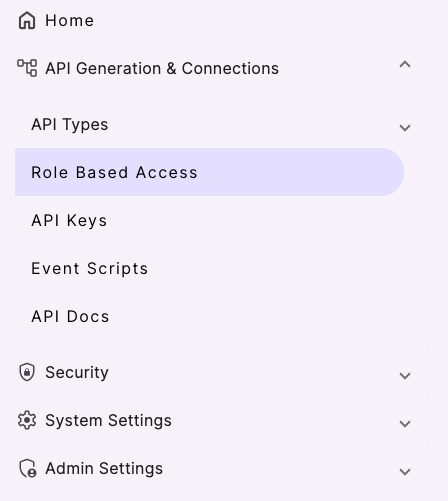
To create a role, in the left navbar click on the Role Based Access tab:
Click the purple + button to create a new Role. You are prompted to enter a role name and description. Unlike the service name, the role name is only used for human consumption so be sure to give it a descriptive name such as MySQL Role. There is an Access Overview section to identify the API(s) which should be associated with this service. The default interface looks like this:
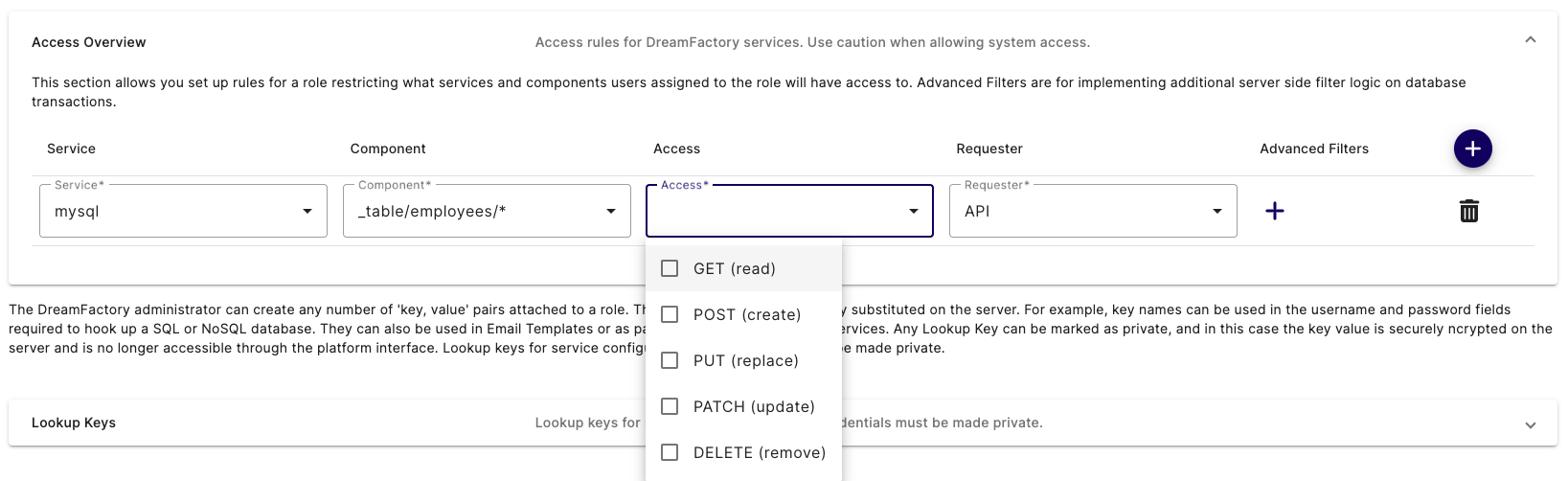
The Service select box contains all of the APIs you've defined thus far, including a few which are automatically included with each DreamFactory instance (system, api_docs, etc). Select the mysql service. Now here's where things get really interesting. After selecting the mysql service, click the Component select box. This select box contains a list of all assets exposed through this API! If you leave the Component select box set to *, then the role has access to all of the APIs assets. However, you're free to restrict the role's access to one or several assets by choosing for example _table/employees/*. This would limit this role's access to just performing CRUD operations on the employees table! Further, using the Access select box, you can restrict which methods can be used by the role, selecting only GET, only POST, or any combination of methods.
If you want to add access to another asset, or even to another service, just click the plus sign next to the Advanced Filters header, and an additional row is added to the interface:
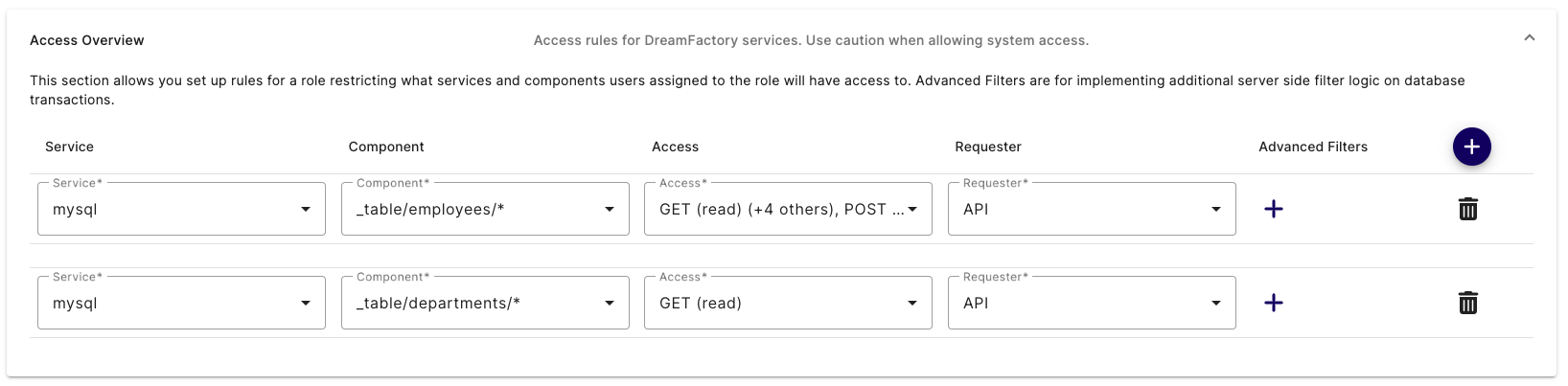
Use the new row to assign another service and/or previously assigned service component to the role. In the screenshot you can see the role has been granted complete access to the mysql service's employees table, and read-only access to the departments table.
Once you are satisfied with the role's configuration, click Save to create the role. With that done, it's time to create a new API Key and attach it to this role.
Example Role
Here is an example of a role that gives GET (read) level access to API Generation & Connections.
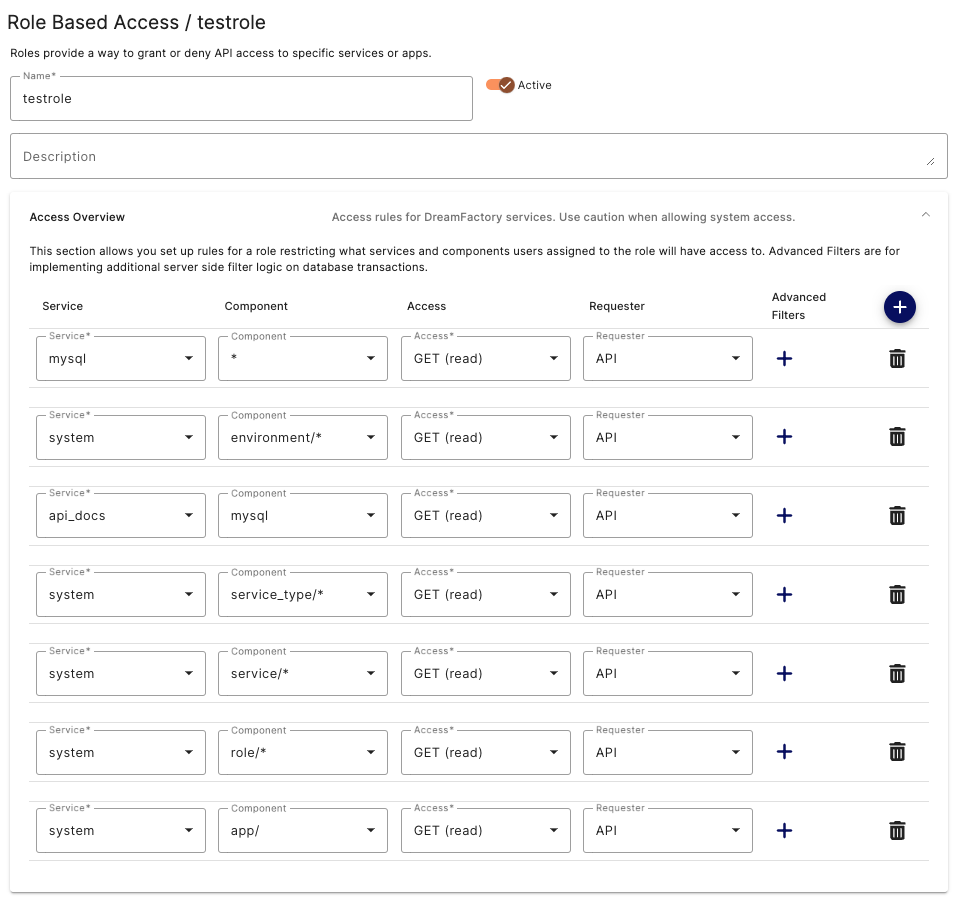
This role is a good starting point for individuals that will be making API calls using API Docs. Being GET only the Database will not be permanently altered by accident. From here you can change or add additional permissons to fine tune the users permissions in the UI. For instance you could add PATCH or DELETE to the Access column if the user needs those for testing purposes.
RBAC and SSO Integration
DreamFactory's RBAC system integrates directly with your identity provider (IdP) when users authenticate via SSO (SAML 2.0, OAuth 2.0, LDAP, or Active Directory). This section explains how roles are assigned at login, how to configure attribute-to-role mapping, and how identity passthrough works in the context of RBAC.
How Roles Are Assigned via SSO
When a user authenticates through an SSO service configured in DreamFactory, the platform evaluates IdP-supplied attributes — such as group membership, department, or job title — and maps them to DreamFactory roles. This mapping is configured per SSO service and happens automatically at login, so users inherit the correct API permissions without any manual role assignment.
The general flow is:
- User authenticates against your IdP (e.g., Okta, Azure AD, Google Workspace).
- The IdP sends a SAML assertion or OAuth token containing user attributes (e.g.,
memberOf: CN=DataAnalysts,OU=Groups,DC=corp,DC=example,DC=com). - DreamFactory evaluates the Role Mapping rules configured for that SSO service.
- The matching DreamFactory role(s) are applied to the user's session.
- An API key bound to those roles controls which endpoints and HTTP methods the user can call.
For details on configuring SSO services, see SSO & Authentication.
Configuring Attribute-to-Role Mapping
Role mapping is configured per SSO service in the DreamFactory admin panel:
- Navigate to Admin > Services and open your SSO service (e.g.,
azure-ad-saml). - Click the Role Mapping tab.
- Add a mapping rule specifying the IdP attribute name, the expected value, and the target DreamFactory role.
Example configuration — mapping an Active Directory group to a DreamFactory role:
| IdP Attribute | Attribute Value | DreamFactory Role |
|---|---|---|
memberOf | CN=DataAnalysts,OU=Groups,DC=corp,DC=example,DC=com | Analyst-Read-Only |
memberOf | CN=DataEngineers,OU=Groups,DC=corp,DC=example,DC=com | Engineer-Full-Access |
department | Finance | Finance-ReadWrite |
The Analyst-Read-Only role in this example would be configured with GET-only access to the relevant database services, while Engineer-Full-Access would permit GET, POST, PUT, PATCH, and DELETE. Users in neither group fall back to the default role configured on the SSO service.
Identity Passthrough and Database Audit Logs
DreamFactory's identity passthrough feature extends RBAC beyond the API layer into your underlying data source. When a user authenticates via SSO and DreamFactory is configured to pass their identity to the database connection, the database's own audit log records the real user identity — not the generic DreamFactory service account.
Why this matters for compliance: In environments subject to HIPAA, SOX, PCI-DSS, or internal audit requirements, database-level audit logs must show which individual accessed or modified data. Without identity passthrough, all database activity appears to come from a single shared service account, which is insufficient for per-user audit trails.
How it works in practice:
- User
alice@corp.example.comauthenticates via SAML SSO. - DreamFactory applies the role mapped from Alice's AD group.
- When Alice's API call reaches the database, DreamFactory sets the database session context to Alice's identity (e.g., via
SET SESSION application_name = 'alice@corp.example.com'in PostgreSQL, or equivalent in other databases). - The database audit log records Alice's identity for that query.
This behavior is configured on the database service connection — contact DreamFactory support or review the database service documentation for connector-specific configuration options.